With the official launch of Gemma 4, the open-source community has a new powerhouse for agentic and multimodal AI. However, the real magic happens when you tailor these models to your specific data. Thanks to Unsloth’s day-one support, you can now fine-tune Gemma 4 up to 2x faster using 70% less VRAM.
Whether you’re working with the ultra-efficient E2B/E4B mobile variants or the massive 31B Dense model, this guide will show you how to leverage Unsloth to create a custom AI powerhouse.
Why Use Unsloth for Gemma 4?
Unsloth has become the industry standard for local fine-tuning because it bypasses the heavy overhead of standard libraries. For Gemma 4, Unsloth provides:
- Memory Efficiency: Run fine-tuning on consumer GPUs with as little as 3GB to 6GB of VRAM.
- Apache 2.0 Compliance: Fully compatible with Gemma 4’s new permissive licensing.
- Multimodal Support: Fine-tune vision and audio layers on the E2B and E4B models.
- Agentic Preservation: Advanced kernels that maintain Gemma 4’s “Thinking Mode” and tool-calling capabilities.
Step-by-Step: Fine-Tuning Gemma 4
1. Hardware & Environment Setup
First, ensure your environment is up to date. Unsloth requires an NVIDIA GPU (RTX 30 series or newer recommended).

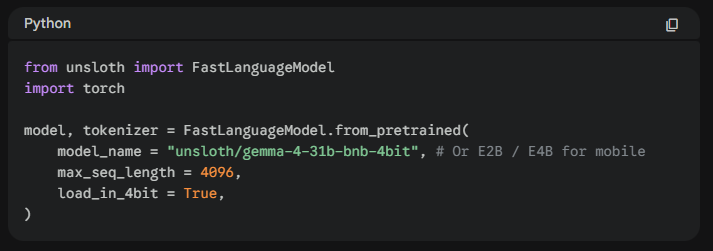
2. Loading the Model
Unsloth provides pre-quantized 4-bit versions of Gemma 4 which are optimized for QLoRA. This significantly reduces the memory footprint without sacrificing accuracy.
3. Configuring LoRA Adapters
To keep the model’s reasoning intact, we apply Low-Rank Adaptation (LoRA).
Pro Tip: For Gemma 4, focus on target modules like
q_proj,k_proj, andv_proj. If you are training the MoE (26B) variant, ensure you use a conservative rank (R=16) to stabilize the experts.
4. Handling the “Thinking Mode”
Gemma 4 introduces a native <|think|> token. When preparing your dataset:
- To preserve reasoning: Include the thought process between
<|think|>tags in your training data. - To focus on speed: Fine-tune only on the final assistant response to bypass the internal monologue.
5. Training & Exporting
Once your SFTTrainer is configured, start the training. Unsloth’s “Fast-Vision” and “Fast-Language” kernels will automatically kick in.
Python
trainer.train()
# Export to GGUF for use in Ollama or llama.cpp
model.save_pretrained_gguf("gemma-4-custom", tokenizer, quantization_method = "q4_k_m")
Benchmark Gains: What to Expect?
Fine-tuning Gemma 4 via Unsloth isn’t just about speed; it’s about accessibility.
- Gemma 4 E2B: Can be fine-tuned on a standard laptop GPU (8GB VRAM).
- Gemma 4 31B: Now accessible on a single RTX 3090/4090 using QLoRA.
| Feature | Standard Training | Unsloth Optimization |
| VRAM Usage (31B) | ~64GB+ | ~16GB |
| Training Speed | 1x | 2.2x |
| Multimodal Support | Limited | Native (Vision/Audio) |
Final Thoughts
Gemma 4 is a massive leap forward for local AI agents. By using Unsloth, you remove the hardware barrier, allowing you to build specialized, private, and lightning-fast models for any niche—from medical coding to autonomous robotics.
Next Steps:
- Download the Gemma 4 Fine-tuning Notebook from the Unsloth GitHub.
- Check out our guide on Dataset Preparation for Agentic AI.
Fine-tuning LLMs Guide with Unsloth
This video provides a practical walkthrough of using Unsloth Studio to fine-tune small language models locally on NVIDIA hardware, which is directly applicable to the new Gemma 4 variants.